Search This Blog

08 September 2015

Another panda sweet treat


Gesture Typing, the swipe keyboard

Retro Gaming

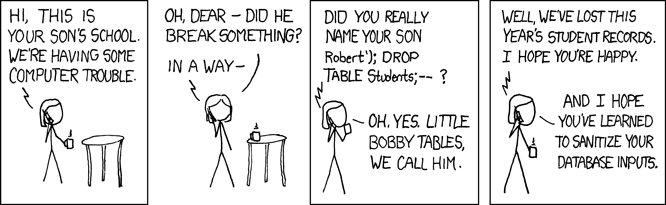
Sanitize the inputs


Validate your CSV


Global variables are BAD


Profiler


By Reference or by value ?
Last but not least, there is no such thing as passing variable by value or by reference.
They are names, take 25 minutes of attention and listen to Ned Batchelder, a name you’ll cross often

31 August 2015


Crunching the crashes
A nice tutorial for pandas, showing how to manipulate and analyse a big CSV file ( 6 000 000 rows +)


lost in data
This one is fun! Another tutorial around data analysis with python, this time working against a TV series database


playing or learning ? both !
Willing to learn python from the start by example on a nice slope ?
A great site
has loads of puzzles to solve in python, it starts at elementary level.
You can then publish (or not) your solution and vote for the best proposal.
Great to see others answers and learn from it.

10 May 2015

TDD: Test Driven Documentation

What's Test Driven Documentation ?

Well the idea is pretty simple, while you write specification in Gherkin you describe the way you want the application to behave.
Writing the documentation is explaining how the application behaves so as to learn how to use it.
What if from good requirements we could infer part of the documentation ?

If we run these tests with behave and run a selenium driver we can leverage to take a few screenshots and add information about what's happening. In short we want to go from

Feature: Devpi server list our personal packages

  As a    Developer
  I want  to access the in house package repository
  So that I can develop the latest and greatest software

  Scenario: see my personal index
    Given I access the main devpi page as "nlaurance"
    When I click My personal repository
    Then I have permission to upload packages
    And I want a "overlined" screenshot saved as "index.png"
    And I document in the "se" as "bubble_list.png" with
       """
       Make sure the upload permission
       is set for you
       """


to


let's have a peek at what's in devpi.py, inside the steps directory


def dom_element_size(dom_element):
    x, y = dom_element.location['x'], dom_element.location['y']
    width, height = dom_element.size['width'], dom_element.size['height']
    return x, y, width, height


@then(u'I have permission to upload packages')
def step_impl(context):
    permissions = context.browser.find_element_by_class_name('permissions')
    assert_that(permissions.text, contains_string(context.user))

    my_permission = permissions.find_element_by_xpath("descendant::span[contains(text(), '{0}')]".format(context.devpi_user))

    outline_elements = getattr(context, 'outline_elements', [])
    outline_elements.append(dom_element_size(my_permission))
    context.outline_elements = outline_elements

at this stage there is a hamcrest assertion, to make sure we comply to the requirement. Then we keep track of the desired element(s) position and size.

@then(u'I document in the "{hotspot}" as "{filename}" with')
def step_impl(context, hotspot, filename):
    outline_elements = getattr(context, 'outline_elements', [])

    screenshot = getattr(context, 'current_screenshot',
                         StringIO(context.browser.get_screenshot_as_png()))
    commented = paste_bubble(screenshot, outline_elements, hotspot, context.text, filename)
    context.current_screenshot = commented


We can take a screenshot at any time, to allow chaining we pass the current screenshot to the context.

so what is paste_bubble doing ?

it uses the ninepatch library to format image ressources to our need. In fact a fork of it to simplify the code.

def paste_bubble(screenshot, coords, hotspot, text, save_as='screenshot.png'):
    image = screenshot if isinstance(screenshot, Image.Image) else Image.open(screenshot)
    for coord in coords:
        x, y, width, height = coord

    # se
    paste_x = int(x + width)
    paste_y = int(y + height)

    bubble_img = bubble(text, hotspot)
    image.paste(bubble_img, (paste_x, paste_y), bubble_img)
    image.save(save_as)
    return image

Yes, this is still at the embryo stage, and the hotspot (position) is not really implemented yet.

def bubble(text, hotspot="se"):
    ninepatch = Ninepatch('./bubbles/{0}.9.png'.format(hotspot))
    text_as_image = text2img(text)
    scaled_bubble = ninepatch.render_with_content(text_as_image)
    if DEBUG:
        scaled_bubble.save('bubble.png')
    return scaled_bubble

Now some play with inkscape and nine patch editor, to create some outlines. In here we have a se.9.png file in the bubbles subdirectory.

This is a work in progress, but that first result is rewarding enough.
I'll see if this deserves a packaging of its own.

02 March 2015

Python Puzzle #2

Here is the challenge #2. This one deserves more explanations.
Your team has to maintain a legacy project, and for various historical reasons, the project has not enough documentation. Features delivery is always a higher priority than the documentation update.
So, you decide it's time that every team member commits to read and improve the documentation.
The plan is to spend an hour every Monday, Wednesday and Friday to this task, each team member in turn.

you want a function, that given a start date and a number of weeks, will assign the team member to this maintenance.


import unittest
import datetime


team_members = [
    "Dilbert",
    "Wally",
    "Alice",
    "Pointy haired Boss",
    "Dogbert",
    "Asok",
    "Ted",
    "Loud Howard",
    "Carol",
    "Ratbert",
    "Catbert",
    "Dilmom",
    "Phil, prince of insufficient light",
    "Bob the dinosaur",
    "Garbageman",
    "Tina",
    "Accountig Troll",
    "Elbonian guy",
    "Mordac",
    "Topper",
    "Liz",
]


def build_rota(start_date, weeks=4):
    pass


class TestDottedToDict(unittest.TestCase):
    def setUp(self):
        self.expected = [(datetime.date(2014, 12, 26), 'Dilbert'),
                         (datetime.date(2014, 12, 29), 'Wally'),
                         (datetime.date(2014, 12, 31), 'Alice'),
                         (datetime.date(2015, 1, 2), 'Pointy haired Boss'),
                         (datetime.date(2015, 1, 5), 'Dogbert'),
                         (datetime.date(2015, 1, 7), 'Asok'),
                         (datetime.date(2015, 1, 9), 'Ted'),
                         (datetime.date(2015, 1, 12), 'Loud Howard'),
                         (datetime.date(2015, 1, 14), 'Carol'),
                         (datetime.date(2015, 1, 16), 'Ratbert'),
                         (datetime.date(2015, 1, 19), 'Catbert'),
                         (datetime.date(2015, 1, 21), 'Dilmom'),
                         (datetime.date(2015, 1, 23), 'Phil, prince of insufficient light'),
                         (datetime.date(2015, 1, 26), 'Bob the dinosaur'),
                         (datetime.date(2015, 1, 28), 'Garbageman'),
                         (datetime.date(2015, 1, 30), 'Tina'),
                         (datetime.date(2015, 2, 2), 'Accountig Troll'),
                         (datetime.date(2015, 2, 4), 'Elbonian guy'),
                         (datetime.date(2015, 2, 6), 'Mordac'),
                         (datetime.date(2015, 2, 9), 'Topper'),
                         (datetime.date(2015, 2, 11), 'Liz'),
                         (datetime.date(2015, 2, 13), 'Dilbert'),
                         (datetime.date(2015, 2, 16), 'Wally'),
                         (datetime.date(2015, 2, 18), 'Alice'),
                         (datetime.date(2015, 2, 20), 'Pointy haired Boss'),
                         (datetime.date(2015, 2, 23), 'Dogbert'),
                         (datetime.date(2015, 2, 25), 'Asok'),
                         (datetime.date(2015, 2, 27), 'Ted'),
                         (datetime.date(2015, 3, 2), 'Loud Howard'),
                         (datetime.date(2015, 3, 4), 'Carol'),
                         (datetime.date(2015, 3, 6), 'Ratbert'),
                         (datetime.date(2015, 3, 9), 'Catbert'),
                         (datetime.date(2015, 3, 11), 'Dilmom'),
                         (datetime.date(2015, 3, 13), 'Phil, prince of insufficient light'),
                         (datetime.date(2015, 3, 16), 'Bob the dinosaur'),
                         (datetime.date(2015, 3, 18), 'Garbageman'),
                         (datetime.date(2015, 3, 20), 'Tina'),
                         (datetime.date(2015, 3, 23), 'Accountig Troll'),
                         (datetime.date(2015, 3, 25), 'Elbonian guy'),
                         (datetime.date(2015, 3, 27), 'Mordac'),
                         (datetime.date(2015, 3, 30), 'Topper'),
                         (datetime.date(2015, 4, 1), 'Liz'),
                         (datetime.date(2015, 4, 3), 'Dilbert'),
                         (datetime.date(2015, 4, 6), 'Wally'),
                         (datetime.date(2015, 4, 8), 'Alice')]

    def test_rota(self):
        got = list(build_rota(datetime.date(2014, 12, 25), weeks=15))
        self.assertListEqual(got, self.expected)

Have fun!

23 February 2015

Python Puzzle #1

I plan to publish a serie of Python puzzle, or challenges.
Mostly around data manipulation, they can be a great way to improve your python skills.
There is many ways to solve this, you can chose your style from:
  • best performance 
  • best readability 
  • least lines of code 
  • most obfuscated 

the goal is to pass the unit test(s).


import unittest


def dotted_to_dict(incoming):
    pass


class TestDottedToDict(unittest.TestCase):
    def setUp(self):
        self.dotted = [{'a': 1, 'b.e.f': 2, 'b.e.g': 9, 'c.a': 5, 'c.d': 10},
                       {'a': 6, 'b.f.f': 8, 'b.f.g': 0, 'c.a': None, 'c.d': 15},
        ]

        self.expected = [{'a': 1, 'b': {'e': {'f': 2, 'g': 9}}, 'c': {'a': 5, 'd': 10}},
                         {'a': 6, 'b': {'f': {'f': 8, 'g': 0}}, 'c': {'a': None, 'd': 15}},
        ]

    def testClasses(self):
        """
        """
        got = dotted_to_dict(self.dotted)
        self.assertEquals(got, self.expected)

Please comment if you feel the question is not clear enough.
Have fun!

04 January 2015

I've just released a small utility to process python source files
https://pypi.python.org/pypi/sourceparse
source and doc available at
https://github.com/nlaurance/sourceparse

I use this to inject code pieces to custom checkers, I hope you'll find it usefull

01 December 2014

# These aren't used but they're a pretty good reference:
double_quoted_string = re.compile(r'((?<!\\)".*?(?<!\\)")')
single_quoted_string = re.compile(r"((?<!\\)'.*?(?<!\\)')")
single_line_single_quoted_string = re.compile(r"((?<!\\)'''.*?(?<!\\)''')")
single_line_double_quoted_string = re.compile(r"((?<!\\)'''.*?(?<!\\)''')")

Found this in pyminifier